EDI 856: What It Is, How It’s Structured, and How Automotive Suppliers Get It Right
The truck left the dock at 2:15. The labels scanned, the packing slip printed, the driver signed the bill of lading. An hour later, an 824 comes back from the customer: ASN rejected.
Nothing was wrong with the parts. Something was wrong with the EDI 856.
For automotive suppliers, the 856 is the point where everything upstream has to agree: the release you shipped against, the labels on the containers, your CUM shipped, and the customer’s rules for that ship-to. The timing is tight, too. In an AIM case study, Gil-Mar Manufacturing described a Ford requirement to send shipment notification within 15 minutes of a shipment leaving its dock, while Gil-Mar was shipping nights and weekends.
This guide explains what an EDI 856 is, how it’s structured, and walks through an annotated automotive example. Then it covers why 856s get rejected and how to keep them in step with your labels and CUMs.
The short answer
An EDI 856 is the ANSI X12 Ship Notice/Manifest, better known as the advance shipment notice (ASN). The supplier sends it to tell the customer exactly what shipped, how it’s packed, and how it’s moving, before it arrives. In automotive, the 856 also feeds the customer’s view of what you’ve shipped against its releases, which is why ASN errors so often turn into CUM disputes.
What is an 856 EDI document?
EDI 856 definition: an EDI 856 is an electronic message, sent by the shipper to the receiver, that describes a shipment’s contents, packaging, and transportation details before the shipment arrives. X12 names it the Ship Notice/Manifest. Almost everyone calls it the ASN. For the broader picture of ASNs in shipping and logistics, see our guide to ASN meaning.
In ANSI X12, each business document is a numbered transaction set. When a customer’s implementation guide refers to the “856 EDI document type,” it means this transaction set. It travels in a functional group with the ID SH.
The direction is usually supplier to customer. But most Tier 1 and Tier 2 suppliers sit on both sides: they send 856s to their OEM and Tier customers, and they receive 856s from their own suppliers of raw material and purchased parts.
| Attribute | EDI 856 |
|---|---|
| X12 name | Ship Notice/Manifest |
| Common name | Advance shipment notice (ASN) |
| Document type | X12 transaction set 856, functional group SH |
| Sent by | The shipper, usually the supplier |
| Sent to | The customer receiving the goods (OEM, Tier customer, or consolidation point as the customer directs) |
| When | When the shipment leaves the dock, within the window the customer sets |
| Carries | Shipment, carrier, packaging, part, quantity, CUM, reference and container serial data |
| Typical responses | 997 Functional Acknowledgment; 824 Application Advice when the content has problems |
| Equivalents | EDIFACT DESADV; VDA and Odette ship-notice messages in European programs |
Where the 856 fits in the automotive EDI cycle
Releases tell you what to ship. The 856 tells the customer what you actually shipped. Everything in between, from production to packaging to labeling, ends up summarized in that one transmission.
- The customer sends demandAn 830 planning schedule, 862 shipping schedule, and for sequenced parts an 866. See EDI 830 vs 862 for how they work together.
- You build, pack and labelStandard pack, containers, and AIAG barcode labels with the customer’s required data.
- You ship and send the 856Shipment, carrier, parts, quantities, CUM shipped and container serials, sent within the customer’s window.
- The customer respondsA 997 confirms the file arrived and could be read. An 824, where the customer uses it, reports problems with the content.
- Billing followsAn 810 invoice, or for some customers, payment driven by the ASN and receiving data.
- The next release closes the loopIts SHP segment reports the customer’s CUM received, built from shipments receipted against your ASNs. Back to step 1
That last step is the one suppliers underestimate. If you’ve read our 830 vs 862 guide, the CUM reconciliation there is the other half of this story: the customer’s CUM received is only as accurate as the ASNs behind it.
A 997 is not an acceptance
The 997 Functional Acknowledgment confirms that your 856 arrived and was syntactically valid. It says nothing about whether the part number, quantity, ship-to or references were right. Business-level problems come back on an 824 Application Advice, if the customer sends one. Teams that watch only for 997s can miss rejections entirely.
How an EDI 856 is structured
An 856 has three parts: a heading that identifies the shipment, a detail section built from hierarchical levels, and a summary that closes the transaction. Around it sits the standard X12 envelope.
Envelope and heading
ISA/GS: the interchange and functional group envelope.GS01isSHfor ship notices.ST: opens the transaction set and assigns a control number that the closingSEmust repeat.BSN: the beginning segment for ship notice. It carries the purpose code (original, replacement or cancellation), your shipment ID, and the date and time the ASN was created. Some customers also require a hierarchical structure code here.DTM: dates and times, most importantly the shipped date and time that customers measure your transmission window against.
The HL hierarchy
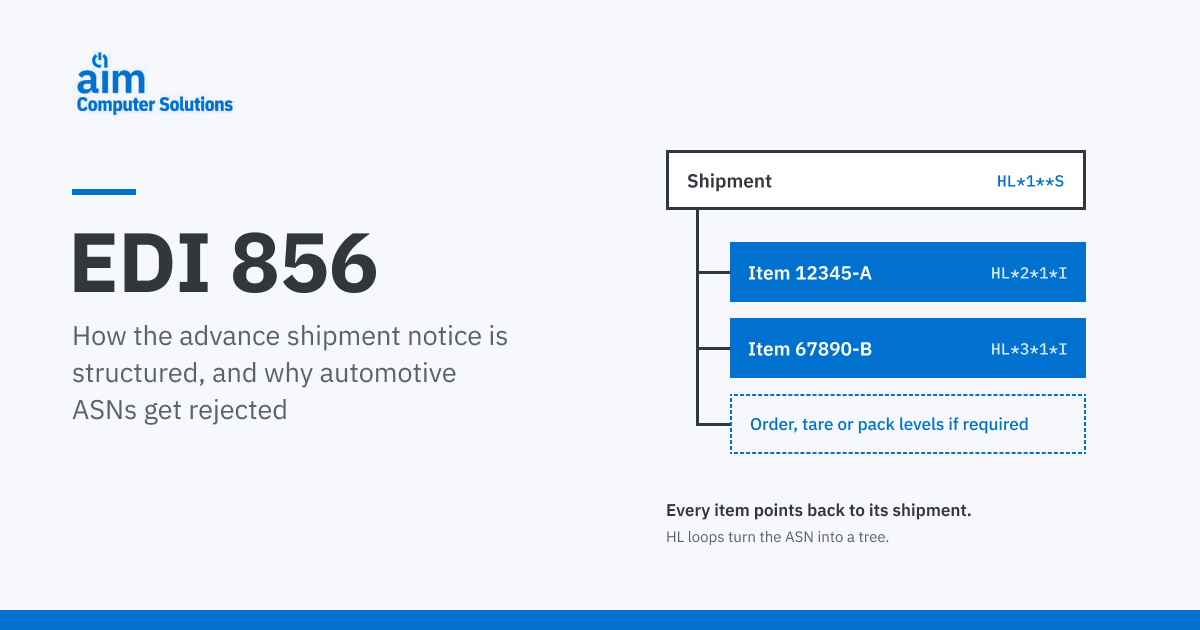
The detail section is built from HL (hierarchical level) loops. Every other detail segment lives inside one. Each HL segment carries three key values: its own ID (HL01), the ID of its parent (HL02), and a level code (HL03). Together they turn a flat file into a tree.
Common level codes are S shipment, O order, T tare (pallet), P pack (container or carton) and I item.
HL*1**S ShipmentCarrier, trailer, weights, bill of lading, packing slip, ship-to and supplier codesHL*2*1*I Item: part 12345-ACustomer part number, quantity shipped, CUM shipped, PO or release reference, containers and label serialsHL*3*1*I Item: part 67890-BOne item loop per part on the shipment, each pointing back to parent 1HL02 on each item points to its parent. A wrong parent ID breaks the tree, and the customer’s system can’t tell which shipment a part belongs to.
Automotive vs. retail hierarchies
Most public 856 guides are written for retail, where the structure revolves around cartons: shipment, order, pack, item, and pick-and-pack variations of that order. Automotive ASNs are usually organized around the shipment and the parts on it. A simple, widely used pattern is shipment → item, with container and serial detail inside the item level. Some OEMs require order, tare or pack levels as well.
The point to take away: the hierarchy is defined by your customer, not by you, and two customers can expect different structures for the same physical shipment.
Segments that matter most in automotive
| Segment | Level | What it carries | Why automotive customers care |
|---|---|---|---|
MEA / TD1 | Shipment | Weights; packaging type and lading quantity | Dock planning and freight verification |
TD5 | Shipment | Carrier SCAC and transport mode | Matches the shipment to the routing the customer expects |
TD3 | Shipment | Trailer or equipment number | Yard and receiving management |
REF*BM / REF*PK | Shipment | Bill of lading and packing slip numbers | Ties the ASN to physical paperwork |
N1 | Shipment | Ship-to plant, supplier and ship-from codes | Routes the ASN to the right plant and supplier account |
LIN | Item | Customer (buyer) part number | The key the customer receives against |
SN1 | Item | Quantity shipped, unit of measure, quantity shipped to date | Feeds release accounting and CUM reconciliation |
PRF | Item | Purchase order or release reference | Matches the shipment to the customer’s demand |
CLD / REF*LS | Item | Number of containers, quantity per container, label serial numbers | Must match the serials on the AIAG labels scanned at receiving |
CTT / SE | Summary | Line or HL count; segment count and control number | Counts that don’t tie out get the file rejected |
Qualifiers, required segments and placement vary by customer and X12 version.
EDI 856 example, annotated
This example picks up where our 830 vs 862 worked example left off. The 862 called for 400 pieces of part 12345-A on Wednesday, October 21. The supplier ships 400 pieces on two pallets of 200. Before this shipment, the supplier’s CUM shipped was 10,000.
ST*856*0001~Opens the 856. Control number 0001 must match the SE segment at the end.
BSN*00*0021457*20261021*1415~Original ASN (00), shipment ID 0021457, created October 21 at 2:15 p.m.
DTM*011*20261021*1415*ET~Shipped date and time (011). This is the clock the customer’s transmission window runs from.
HL*1**S~Hierarchical level 1, no parent, shipment level.
MEA*PD*G*1840*LB~Gross weight of the shipment: 1,840 lb.
TD1*PLT90*2~Packaging code and lading quantity: two pallets.
TD5*B*2*ABCD*M~Carrier identified by SCAC (2) ABCD, motor freight (M).
TD3*TL**TRL4471~Trailer (TL) number TRL4471.
REF*BM*BOL0021457~Bill of lading number.
REF*PK*PS0021457~Packing slip number. It must match the paperwork on the truck.
N1*ST**92*PLT07~Ship-to: the customer’s plant code PLT07, assigned by the buyer (92).
N1*SU**92*SUP1234~Supplier code the customer assigned to you.
HL*2*1*I~Hierarchical level 2, parent 1, item level.
LIN**BP*12345-A~The buyer’s part number (BP).
SN1**400*EA*10400~400 pieces shipped. Quantity shipped to date, your CUM shipped, is now 10,400.
PRF*PO45822~The customer’s purchase order reference. Some customers also require a release, RAN or Kanban reference.
CLD*2*200*PLT90~Two containers (pallets) of 200 pieces each.
REF*LS*S00123401~Serial number on the first pallet’s label.
REF*LS*S00123402~Serial number on the second pallet’s label. Both must match what the customer scans.
CTT*2~Count used for validation; here, the number of HL segments.
SE*21*0001~21 segments from ST to SE, control number 0001.
Reading it back: the CUM check
In the 830/862 example, the customer’s last reported CUM received was 9,800, and 200 pieces shipped on October 19 were still in transit. Add this shipment, and here’s how the numbers should reconcile:
SHP segmentSN1 once both are receiptedIf a later 830 or 862 reports a CUM received that doesn’t reconcile, a missing, duplicated or incorrect ASN is one of the first things to check.
Required by the standard vs. required by your customer
Ask two EDI guides which 856 segments are mandatory and you can get two very different answers. One will say that, beyond the heading, only the HL loop is required. Another will list a dozen “mandatory” segments. Both are right, because they’re describing different things.
What the X12 standard requires
- Transaction set header and trailer (
ST,SE) - Beginning segment (
BSN) - At least one HL loop
- Mandatory elements inside any segment you use
What your customer’s guide adds
- Required segments, qualifiers and their placement
- The HL structure for each ship-to
- Reference numbers: PO, release, RAN, Kanban, dock code
- Transmission deadlines and correction rules
- The X12 version and test-to-production process
In practice, the standard is the minimum and the customer’s implementation guide is the specification. Build to the guide, customer by customer, version by version, and ship-to by ship-to. A map that passes for one plant can fail at another plant of the same OEM.
EDIFACT, VDA and Odette equivalents
Suppliers shipping to European or global customers often send ship notices in other standards. The business purpose is the same; the segment structures are different.
| Standard | Ship notice message | Where you’ll see it |
|---|---|---|
| ANSI X12 | 856 Ship Notice/Manifest | North American OEMs and Tier customers |
| UN/EDIFACT | DESADV (Despatch Advice) | Global and European customers |
| VDA | VDA 4913, and VDA 4987 based on DESADV | German automotive programs |
| Odette | AVIEXP | Some European automotive programs |
Why automotive 856s get rejected
A shipment can be physically perfect and electronically wrong. These are the failure points behind most automotive ASN rejections. For more on how errors start upstream, see how automotive supply chain software prevents costly shipping errors.
Data that doesn’t match the release
Wrong customer part number, a quantity the release didn’t call for, or a ship-to code that doesn’t exist for that part. The ASN is checked against the customer’s own demand data.
Serials that don’t match the labels
The serials in REF*LS must match the labels the customer scans. A relabeled pallet, a reprinted label, or a manually edited ASN breaks the match.
A broken structure
An HL pointing to the wrong parent, a level the customer doesn’t accept, or CTT and SE counts that don’t tie out.
Late transmission
The ASN goes out after the customer’s window closes, or after the freight arrives. Batch jobs and end-of-shift transmissions are common causes.
Missing references
No release, PO, RAN or Kanban number where the guide requires one, or the wrong supplier or ship-from code.
CUM drift
A duplicated ASN, a missing one, or a correction sent the wrong way leaves the customer’s CUM received out of step with your CUM shipped, and every net requirement after that is affected.
One more failure doesn’t show up as a rejection at all: an 824 that arrives and nobody reads. Monitoring acknowledgments and application advice is as important as sending the ASN.
Keeping the 856, labels and CUMs in sync
Most ASN problems aren’t EDI problems. They’re shipping-data problems that the EDI exposes. The fix is to generate the 856 from the same verified data that produced the labels and the shipper, rather than re-keying it.
- Scan what you ship. Verify what was pulled and staged against what was planned, before the shipper is closed.
- Reconcile master and mixed loads. Master and mixed-load labels should be generated from, and reconciled to, the individual container labels.
- Check the ASN before it leaves. Catch missing or incorrect data against the customer’s rules while there’s still time to fix it.
- Hold the ASN when quality says so. If a GP12 containment or prototype dock audit is required, the paperwork and ASN shouldn’t go out until it’s done.
- Send automatically when the shipper is complete. Tying transmission to the shipper update removes the gap where windows get missed.
These are the workflows AIM builds around. AIM’s Mobility apps scan-verify shipments at the dock, and the Dock Audit app can hold shipper paperwork and ASN transmission until the audit is performed. ASN accuracy checks pre-check ASNs for missing or incorrect data against customer requirements, and ASNs can be set up to send automatically once the shipper update is complete.
“We were continuously paying to have label and/or EDI changes rushed into production. With AIM’s vetted label and EDI formats, we no longer worry about last minute changes and software breaking. It just runs and does what it is supposed to do.”Randy Grewe, IT Manager, P.J. Wallbank Springs
P.J. Wallbank Springs implemented AIM AutoCOR with Epicor to manage customer-specific automotive EDI, barcode labeling, ASNs, and shipping workflows, with barcode labels and ASNs validated customer by customer.
ASN timeliness and accuracy also come up in MMOG/LE assessments. Our breakdown of MMOG/LE Requirement 4.3.2 covers shipment documentation and ASN transmission. Validated, automated ASNs support those workflows; they don’t by themselves make a supplier compliant.
Receiving 856s from your own suppliers
The ASN conversation is usually about outbound shipments to customers. But if you buy raw material and purchased parts, your suppliers’ 856s matter just as much: they tell your receiving team what’s coming and let you receive against expected quantities instead of keying paperwork at the dock.
AIM handles inbound supplier ASNs as well as outbound customer ASNs. With AIM AutoCOR, supplier ASNs feed Epicor Receipt Entry, which updates part quantities in inventory. In AIM Vision, supplier ASNs are identified as anticipated orders in the purchasing module, so material is visible before it arrives.
Questions to confirm with every customer
Most ASN rejections trace back to an assumption about what a customer expects. Ask these during onboarding, and again when a customer changes its EDI version or launches a new program.
- Which X12 version and implementation guide apply to each ship-to?
- What HL structure do you require?Shipment and item only, or order, tare and pack levels as well?
- What is the transmission deadline after the shipment leaves the dock?
- Which references are required?PO, release, RAN, Kanban, dock code, packing slip, bill of lading.
- Do you require quantity shipped to date (CUM) on the ASN?
- How should corrections and cancellations be sent?Replacement ASN, or cancel and resend?
- Do you send 824 Application Advice, and who on our side receives it?
- Is billing a separate 810 invoice, or is payment driven by ASN and receipt data?
- What are the label requirements that the ASN serials must match?
What your system should do with 856s
Whatever software you use, these are the capabilities that keep ASNs accurate and on time. If you’re still building your EDI foundation, start with how to become EDI capable.
- Build the ASN from scanned shipment data, not re-keyed data.
- Apply customer-specific ASN rules for each customer and ship-to.
- Validate the ASN before it’s transmitted.
- Keep label serials, ASN data and CUM shipped tied to the same shipment record.
- Transmit automatically when the shipper is complete.
- Monitor 997s and 824s, and route exceptions to someone who can act on them.
- Support X12, EDIFACT, VDA and Odette where your customers require them.
- Receive inbound supplier ASNs against expected receipts.
Generic ERP systems often handle shipping well but weren’t designed around automotive ASN rules, CUM accounting and customer-specific label data. That’s the gap AIM’s automotive EDI software was built to close.
How AIM handles the 856
AIM supports 535+ EDI trading partners and 2,000+ barcode label formats. The right solution depends on your ERP and on which system you want to own day-to-day shipping.
You want to keep your current ERP.Your ERP keeps managing shipping, labeling and scanning. Shipper, package and barcode data returns to AIM, which generates the outbound ASN with customer-specific logic and updates CUM and shipment records.
AIM AutoConnectYou need deeper ASN and shipping control alongside your ERP.AIM manages automotive EDI, release accounting, labeling, shipping, ASNs and multi-plant control, with error detection based on OEM business logic to help minimize ASN rejections.
AIM AutoSysYou run Epicor ERP or Epicor Kinetic.Epicor stays your system of record. Labels are scanned to build customer-specific shippers and ASNs, and AutoCOR transmits the 856 and 810, updating Epicor with quantities shipped and invoiced.
AIM AutoCORYou’re replacing your ERP.AIM Vision runs EDI, release accounting, labeling, shipping and ASNs in one AIM ERP environment, with ASNs that can send automatically when the shipper update is complete.
AIM VisionGetting ASN rejections you can’t explain?
Send us one customer’s rejected ASN or 824. An AIM specialist will walk through the 856 against that customer’s requirements and show you where the data broke and what it would take to stop it happening again.
It’s a workflow review, not a product pitch.
Request a workflow reviewFrequently asked questions
What is an 856 EDI document?
An 856 EDI document is the ANSI X12 Ship Notice/Manifest transaction set, commonly called the advance shipment notice (ASN). The shipper sends it to the receiver to describe what is in a shipment, how it is packed, and how it is being transported, before it arrives.
What is the EDI 856 definition?
The EDI 856 is an electronic message, sent by the shipper to the receiver, that describes a shipment’s contents, packaging, and transportation details before the shipment arrives. X12 calls it the Ship Notice/Manifest.
Is an EDI 856 the same as an ASN?
In X12 environments, yes. ASN is the business term and 856 is the X12 transaction set used to send it. Customers using other standards send ASNs as EDIFACT DESADV, VDA or Odette messages. For more on ASNs in general, see our guide to ASN meaning.
What does an EDI 856 example look like?
An 856 is a series of segments: a heading (ST, BSN, DTM), hierarchical levels for the shipment and each item, and a summary (CTT, SE). See the annotated EDI 856 example above for a full automotive illustration.
Who sends the EDI 856, and when?
The shipper, usually the supplier, sends it to the customer receiving the goods. It is normally sent when the shipment leaves the dock, within a transmission window the customer defines in its implementation guide.
What is the difference between a 997 and an 824 for an ASN?
A 997 Functional Acknowledgment confirms the 856 was received and could be read. An 824 Application Advice reports business-level problems with the content, such as an invalid part number, quantity or reference. A 997 alone does not mean the ASN was accepted.
What is the HL segment in an 856?
HL stands for hierarchical level. Each HL segment has its own ID, its parent’s ID and a level code (such as S for shipment or I for item), which together organize the ASN into a tree. All other detail segments in an 856 sit inside an HL loop.
What is the EDIFACT equivalent of the EDI 856?
The UN/EDIFACT equivalent is DESADV (Despatch Advice). German automotive programs may use VDA 4913 or VDA 4987, and some European programs use the Odette AVIEXP message.
How does the EDI 856 affect CUM quantities?
In automotive, the 856 can carry quantity shipped to date, your CUM shipped, and the customer builds its CUM received from shipments receipted against your ASNs. A missing, duplicated or incorrect ASN can leave the two CUMs out of step. See EDI 830 vs 862 for how CUM reconciliation works.
Can I send a corrected or cancelled 856?
The BSN purpose code lets an 856 be marked as an original, a replacement or a cancellation. Customers differ on which they accept, so follow the correction process in each customer’s implementation guide.
EDI segment examples and quantities in this article are simplified illustrations, not any customer’s implementation guide. Always follow your trading partner’s published EDI specifications and supplier requirements.