EDI 997 vs. 824: Why a Clean Acknowledgment Doesn’t Mean Your ASN Was Accepted
Picture this: The truck pulled out at 6:40. The 856 went out a few minutes later, and a 997 came back accepted. As far as the shipping office knew, that shipment was done.
Mid-morning, an 824 landed in a shared EDI mailbox. The customer’s system had rejected the ASN. Nobody saw it until the customer’s materials team called to ask why a truck was at their dock with no usable ASN behind it.
Both acknowledgments were accurate. They were answering different questions. This article explains what the EDI 997 and EDI 824 each tell you, why the gap between them creates risk for automotive suppliers, and how to build a routine that catches problems before your customer does.
The short answer
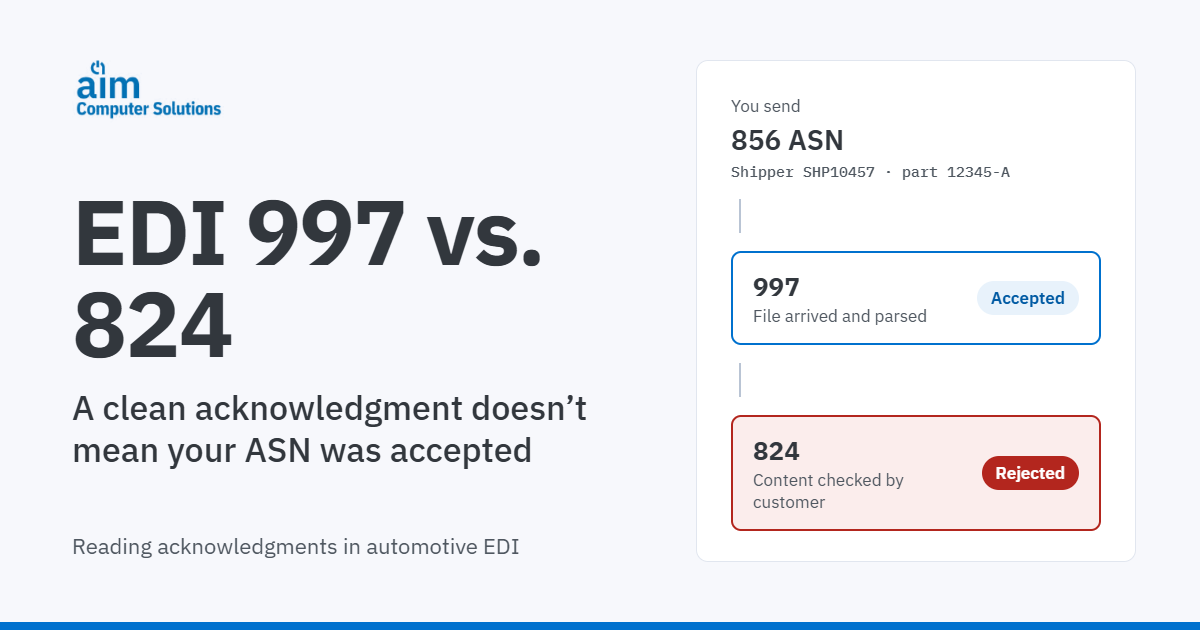
An EDI 997 Functional Acknowledgment confirms that a transmission arrived and passed X12 syntax checks. An EDI 824 Application Advice reports whether the customer’s business application accepted, accepted with errors, or rejected the content. A 997 can say “accepted” while an 824 rejects the same ASN.
Did the file arrive and parse?
Checked by the customer’s EDI translator
A 997 “accepted” says nothing yet about part numbers, quantities, CUMs or dock codes.
Can our system use this data?
Checked by the customer’s receiving or ASN application
Where the 997 and 824 fit in the automotive EDI flow
Acknowledgments travel in both directions. When a customer sends you an 830 planning schedule or an 862 shipping schedule, your system returns a 997 to confirm receipt, often within a time frame the customer’s guideline sets. (For how those two schedules work together, see EDI 830 vs 862.)
When you send an EDI 856 ship notice, the customer returns a 997. Then, if its implementation uses one, it sends an 824 once its application has checked the data.
Customer to you
- 830 / 862Planning and shipping schedules (and 850 purchase orders in some programs)
- 997You confirm receipt and syntax, within the customer’s time frame where one is set
You to customer
- 856 / 810ASN when the shipment leaves, and an invoice where the customer requires one
- 997The customer confirms receipt and syntax
- 824The customer’s application accepts or rejects the content, if the customer uses the 824
- 861 / 820Receiving advice and remittance, where the customer uses them
Which acknowledgments you exchange depends on the trading partner, not the standard. The trading-partner programs in AIM’s 2026 product catalog show how much this varies. Mark IV (Dayco) lists both the 824 and the 997. Flex-N-Gate/Ventra lists the 997 without an 824, and Marelli lists the 824 without a 997. Ford Ship Direct lists 824s in both directions.
So the first rule is simple: read each customer’s implementation guideline for acknowledgments, the same way you read it for ASN content. If you’re new to how standards and guidelines relate, start with EDI standards explained.
What is an EDI 997 functional acknowledgment?
The 997 is generated by the receiver’s EDI translator, usually automatically. The translator checks the envelope, segment structure, required elements and code values against the X12 standard and version, then reports what it found.
A 997 confirms receipt and syntax. It doesn’t tell you whether the customer’s application will accept the part number, quantity, dock code or CUM on your ASN.
How to read a 997
Simplified 997 acknowledging one 856 ASN (illustrative)
ST*997*0001~Start of the 997.
AK1*SH*1234~AK1 names the functional group being acknowledged. SH is a ship notice group; 1234 is its group control number.
AK2*856*0001~AK2 names one transaction set inside it: the 856 with control number 0001.
AK5*A~AK5 is the result for that transaction set. A is accepted, E is accepted with errors, R is rejected.
AK9*A*1*1*1~AK9 is the result for the whole group, with counts of sets included, received and accepted. P means partially accepted.
SE*6*0001~End of the 997. When there are errors, AK3 and AK4 segments point to the segment and element that failed.
One detail matters more than it looks. A group can be partially accepted. If your team only checks whether “a 997 came back,” a rejected ASN inside an otherwise accepted group can slip through. Reconcile each 856 to its own AK2 and AK5.
Common reasons a 997 rejects
- Envelope or control-number problems, such as duplicate or mismatched control numbers.
- Missing mandatory segments or elements.
- Invalid code values or data types.
- The wrong X12 version for that customer.
- Mapping errors after a customer changes its specification.
The missing 997 problem
A missing 997 is ambiguous. Either your file never arrived, or the acknowledgment never made it back. Either way, you can’t assume the customer has your ASN. On the inbound side, a 997 you fail to send for a release can count against you where the customer’s guideline requires it.
What is an EDI 824 application advice?
The 824 comes from the customer’s business application, not its translator. After your ASN passes syntax checks, the customer’s system compares the content with what it expects. That typically covers valid part numbers, ship-to and dock codes, release references, quantities, pack data and, in many programs, CUM shipped. The 824 then reports the result for the original document.
The document loaded. Some customers confirm every acceptance; others only write when something is wrong.
The document loaded, but something needs attention. Some customers call these warnings, and some still expect a correction.
The document didn’t load. Correct it and resend it the way the customer’s guideline specifies.
How to read an 824
Simplified 824 rejecting an 856 ASN for part 12345-A (illustrative)
ST*824*0001~Start of the 824.
BGN*00*824000117*20261105~BGN opens the advice: purpose code 00 (original), the 824’s own reference number and its date.
OTI*TR*SI*SHP10457***20261105**1234*0001*856~OTI identifies the original document and the result. TR is rejected (TA is accepted, TE is accepted with errors). SI and SHP10457 are the shipper number on the ASN. The last elements carry its group and transaction control numbers and the 856.
TED*848*CUM QTY SHIPPED DOES NOT MATCH~TED describes the error with a code and text. Codes and wording vary by customer.
SE*5*0001~End of the 824.
The OTI reference is your trace back to the shipment. If your system can’t connect an 824 to the shipper and ASN it rejected, someone ends up matching them by hand.
Why automotive ASNs get 824s
- A part number that isn’t valid for that ship-to, or was superseded by an engineering change.
- A ship-to, ship-from or dock code that doesn’t match the customer’s records.
- A missing or invalid PO, release, RAN or Kanban reference.
- Quantities or pack data that don’t match the release or standard pack.
- A CUM shipped that doesn’t match the customer’s CUM received.
- Serial or package IDs on the ASN that don’t match the labels on the parts.
- Timing problems, such as an ASN sent late, where the customer checks for them.
For the wider list of ASN mistakes and how they show up on the dock, see ASN meaning and common ASN errors.
No 824 doesn’t always mean accepted
Some customers send an 824 only when something is wrong, so silence usually means the ASN loaded. Others send acceptances too, so every ASN should get an 824 back. For those customers, a missing 824 is a problem to investigate, not a pass. Write down which model each customer uses.
Related documents
Some partners use the 864 Text Message for notices meant to be read by people rather than processed by systems. And the 824 doesn’t replace a document-specific response. A purchase order, for example, is answered with an 855, as covered in our EDI 850 guide.
997 vs. 824 at a glance
| 997 Functional Acknowledgment | 824 Application Advice | |
|---|---|---|
| Question it answers | Did the file arrive and parse? | Is the content acceptable? |
| What it checks | Syntax and structure against the X12 standard | Business rules in the customer’s application |
| Who generates it | The receiver’s EDI translator | The receiver’s business application |
| Typical failure | Envelope, segment or mapping errors | Part, quantity, CUM, dock or reference errors |
| Who usually fixes it | EDI or IT | Shipping, materials or customer service, with EDI |
| How urgent | Immediately: you need to know the data arrived | Before the shipment is received or payment is affected |
| Required? | Usually, per the customer’s guideline | Only where the customer uses it |
One ASN, two answers: what happens in the gap
Here’s how the opening scenario plays out for one shipment of part 12345-A. Times are illustrative.
- 6:40 a.m.The truck leaves. The 856 for shipper SHP10457 is transmitted.
- 6:52 a.m.A 997 comes back with AK5*A. The shipment is marked complete.
- 10:15 a.m.An 824 comes back with OTI*TR: CUM shipped doesn’t match. It sits in a shared mailbox.
- 1:30 p.m.The truck arrives. The customer can’t match the receipt to an accepted ASN.
- 2:00 p.m.Materials gets a call. Someone traces the 824 to the shipper, corrects the data and resends the ASN.
What that costs depends on the customer’s terms, but the consequences are predictable. You face expediting and phone calls, a corrected ASN sent under time pressure, and a possible hit to delivery or ASN-accuracy scoring. Under some customers’ terms, you may also face a chargeback. In programs where payment is driven by ASN and receipt data rather than a separate invoice, a rejected ASN can also delay payment.
The real cost isn’t the 824 itself. It’s the hours between when the 824 arrived and when someone acted on it.
How to monitor 997s and 824s
Monitoring works when it’s a routine with owners, not a mailbox someone checks when they have time. The basics:
- Reconcile every outbound 856 and 810 to a 997 at the transaction level. Alert on anything still unacknowledged after the customer’s expected window.
- Know each customer’s 824 model. Record whether it sends errors only or acceptances too, so silence means something.
- Give every 824 an owner and a response target. Route by error type, not to whoever happens to open the mailbox.
- Trace every 824 to the shipper, labels and ASN it refers to, then confirm the corrected ASN was accepted.
- Track repeat errors by customer and error code. The same TED code twice is a process problem, not bad luck.
- For multi-plant suppliers, route exceptions to the plant that owns them. One shared mailbox makes every plant dig through every other plant’s errors.
| Exception | Usually owned by | Why |
|---|---|---|
| 997 rejection | EDI or IT | Translator, envelope or map issue |
| Part, ship-to or reference error | Customer service or EDI coordinator | Master data or trading-partner setup |
| Quantity, pack or CUM error | Materials and shipping | Release interpretation or shipment data |
| Label-to-ASN mismatch | Shipping | Label or scanning process |
| Timing error | Shipping supervisor | Transmission schedule or process |
Adjust ownership to your organization. What matters is that every type has a name next to it.
Acknowledgment monitoring is also part of a sound control environment, which we cover in how to keep your EDI secure.
Prevent 824s before the truck leaves
Many 824 rejections trace back to decisions made before the ASN is built. The fix is upstream.
| 824 cause | Where it usually starts | Upstream control |
|---|---|---|
| CUM variance | A release misread, or a CUM adjustment never applied | Supplier and customer CUMs tracked for each trading partner |
| Part or reference error | Release data rekeyed by hand | Inbound EDI applied to demand without re-entry |
| Label-to-ASN mismatch | Labels and ASN built from different sources | Labels and ASN generated from the same shipment data |
| Quantity or pack discrepancy | Shipment not verified before departure | Scan verification of staged goods before the ASN is sent |
| New rejections on a stable program | A customer changed its ASN rules, labels or ship-to codes | Trading-partner requirements kept current |
Labels deserve particular attention, because the ASN and the labels describe the same physical parts. When AIAG barcode labels and the ASN draw on the same data, you remove a common source of mismatch. For more on stopping errors at the dock, read how automotive supply chain software prevents costly shipping errors.
Acknowledgment self-check
Answer these for your top customers. Each “no” is a place where an 824 can sit unnoticed.
- Can you list every 824 still open today?
- Do you know which ASNs from the past week have no 997?
- Do you know whether each customer sends 824s on errors only, or on every ASN?
- Does every 824 have a named owner and a response target?
- Can you trace any 824 to its shipper, labels and ASN in a few minutes?
- Are labels and ASNs built from the same shipment data?
- Do exceptions go to the plant that caused them?
- Are you sending 997s for inbound releases within each customer’s time frame?
How AIM handles acknowledgments
AIM supports 535+ EDI trading partners and 2,000+ barcode label formats. AIM’s automotive EDI software captures reference data from inbound EDI and applies it to labels and ASNs. It also provides exception reporting and an EDI dashboard for monitoring activity. The right product depends on your ERP and on which system owns shipping.
You want to keep your current ERP.Your ERP keeps managing shipping, labeling and scanning. Shipper, package and barcode data returns to AIM, which applies customer-specific logic, generates the outbound ASN and updates CUM and shipment records. Your team can monitor acknowledgments through AIM’s EDI tools.
AIM AutoConnectYou need deeper ASN and shipping control alongside your ERP.AutoSys generates 856 ASNs with customer-specific packaging logic and checks ASN data against customer requirements before the shipment goes out. A 997/824 monitoring dashboard flags exceptions, and a decentralized EDI mailbox with plant-specific company codes lets each plant work its own exceptions.
AIM AutoSysYou run Epicor ERP or Epicor Kinetic.Epicor stays your system of record. AutoCOR supports the 997 and 824 alongside the 830, 862, 850/860, 856 and 810. It creates AIAG labels and ASNs, and AIM Mobility Shipping scan-verifies staged goods before paperwork and the ASN go out.
AIM AutoCORYou’re replacing your ERP.AIM Vision manages inbound and outbound EDI, including 997s and, for trading partners whose programs include it, 824s. Release accounting, labeling and shipping sit in the same AIM ERP environment. Its EDI Workbench shows whether a 997 is required, created or sent for each inbound transaction.
AIM VisionFor multi-plant suppliers, where exceptions land matters as much as how fast they’re found. American Mitsuba, whose parent company runs SAP, used AIM AutoSys to decentralize plant-level EDI processing. Each site can now focus on its own EDI exceptions instead of searching thousands of unrelated documents.
“We needed a decentralized EDI mailbox so each plant could focus on its own errors.”
Dave Falater, North American IT Director, American Mitsuba Corporation
Not sure which 824s are still open?
Bring your two or three most demanding customers. An AIM specialist will walk through how their 997s, 824s and ASN requirements would be handled, and show you where acknowledgment exceptions are most likely to slip through today.
It’s a workflow review, not a product pitch.
Request a workflow reviewFrequently asked questions
Does a 997 mean my ASN was accepted?
No. A 997 only confirms that your ASN arrived and passed X12 syntax checks. Whether the customer’s system accepted the content, such as part numbers, quantities, dock codes and CUM shipped, is reported separately in an 824 Application Advice, if the customer uses one.
What is the difference between an EDI 997 and an EDI 824?
The 997 Functional Acknowledgment comes from the receiver’s EDI translator and confirms receipt and syntax. The 824 Application Advice comes from the receiver’s business application and reports whether the content was accepted, accepted with errors, or rejected. One checks the format; the other checks the business data.
If I don’t receive an 824, was my ASN accepted?
It depends on the customer. Some send an 824 only when there’s a problem, so silence usually means the ASN loaded. Others confirm acceptances too, so a missing 824 should be investigated. Check each customer’s implementation guideline and record which model it uses.
Do I need to send a 997 in response to an 824?
Often, but not always. The 824 is an EDI document like any other, so many guidelines expect a 997 back. Some customers don’t require or monitor one. Follow the customer’s implementation guideline.
What are the EDIFACT equivalents of the 997 and 824?
In UN/EDIFACT, CONTRL plays the role of the 997, reporting syntax-level acceptance or rejection. APERAK plays the role of the 824, reporting application-level errors or acknowledgment. Suppliers shipping to European customers may see these instead of X12 acknowledgments.
What is the difference between an 824 and an 864?
The 824 is structured for systems to process: it references the original document and carries coded results and errors. The 864 Text Message carries free-form text meant for people to read. Some customers use the 864 for notices alongside or instead of 824s.
Who should own 824s at an automotive supplier?
Ownership should follow the error type. EDI or IT usually handles syntax and mapping problems, customer service handles part and reference errors, materials and shipping handle quantity and CUM errors, and shipping handles label mismatches. Multi-plant suppliers should route exceptions to the plant that shipped.
The EDI examples in this article are simplified illustrations. Segment usage, codes and required acknowledgments vary by customer and EDI version, so always follow your trading partner’s implementation guide. Trading partner examples reflect the transaction sets listed in AIM’s 2026 product catalog.