EDI 850 in Automotive: When the Purchase Order Is the Demand Signal
A customer’s purchase order lands in your EDI inbox. On paper it’s simple: a part number, a price, a delivery date, a ship-to. In practice, it doesn’t become a clean sales order. The price on the PO for part 12345-A doesn’t match the price in your ERP, so someone rekeys it. The acknowledgment you send back doesn’t match either.
Release accounting can’t help here, because there’s no release to account for. An 830 or 862 tells you how much a customer will pull against an agreement. An 850 is the agreement, or in some programs the order itself. Knowing which one you’re dealing with decides how orders get created, how changes are applied and which price ends up on your invoice.
The short answer
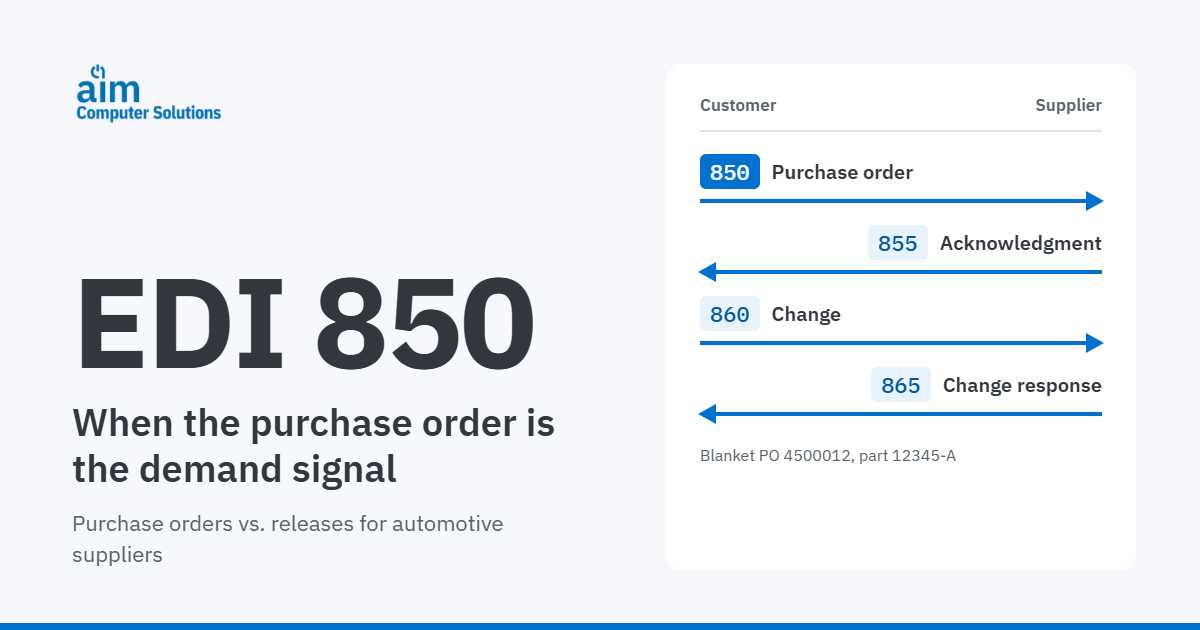
An EDI 850 is a customer’s purchase order. It establishes a discrete order or a blanket order: parts, quantities, prices, dates and terms. The buyer changes it with an 860, and the supplier responds with an 855 acknowledgment and, in some programs, an 865. In most automotive production programs, the 830 forecasts and the 862 sets firm shipments, but some customers send an 850 as the firm order for a part or PO instead of an 862. In programs with no releases at all, the 850 is the only demand signal.
The purchase order flow at a glance
Four documents make up the purchase order conversation between a customer and a supplier. Three more carry the order through shipment and payment.
- 850Purchase OrderPlaces the order: parts, quantities, prices, dates, ship-to and terms.Sent from customer to supplier.
- 855Purchase Order AcknowledgmentAccepts the order, rejects it or accepts it with changes.Sent from supplier to customer.
- 860Purchase Order ChangeChanges quantities, prices, dates or ship-to, or cancels lines.Sent from customer to supplier.
- 865Change Acknowledgment/RequestResponds to the buyer’s change, or proposes one from the supplier side.Sent from supplier to customer.
- Then the order ships and gets paid
- 856Advance Ship NoticeReports what shipped against the order.Sent from supplier to customer.
- 810InvoiceBills for what shipped, at the order’s price and terms.Sent from supplier to customer.
- 820Remittance AdviceShows what the customer paid and why.Sent from customer to supplier.
An 855 is not a 997
Inbound 850s and 860s typically get a 997 Functional Acknowledgment, which confirms the file arrived and could be read. The 855 is a different kind of answer: a business response that tells the customer whether you accept the order as sent. When a customer requires 855s, a 997 doesn’t take their place.
The 850 in other EDI standards
Customers that use UN/EDIFACT or Odette send the same purchase order information in different messages. In AIM’s trading partner catalog, for example, BMW’s EDIFACT program includes ORDERS, and Lucid’s includes both ORDERS and ORDCHG. For more on how the standards differ, see EDI standards explained.
| Document | ANSI X12 | UN/EDIFACT | Odette |
|---|---|---|---|
| Purchase order | 850 | ORDERS | ORDERR |
| Purchase order change | 860 | ORDCHG | ORDERR |
| Order response | 855, 865 | ORDRSP | Varies |
Mappings and usage vary by customer. Always follow the customer’s implementation guide.
What each document does
850 Purchase Order
The 850 is where the commercial terms live. A typical 850 carries the PO number and date, line items with the customer’s part numbers, quantities, unit prices, requested delivery or ship dates, ship-to locations and payment terms.
The most important thing to know about any customer’s 850 is which kind of order it is:
Discrete order
A specific quantity for specific dates. You fill it, ship it, invoice it, and the order closes.
Blanket order
Sets the part, price and terms for a period. Releases, or later orders, draw quantities against it.
Here’s a simplified blanket 850 for part 12345-A:
ST*850*0001~Opens the 850 transaction set.BEG*00*BK*4500012**20261102~00 marks an original order. BK marks a blanket order; a stand-alone order uses SA. Then the PO number and PO date.ITD*01*3*****45~Payment terms: net 45 days from the invoice date.N1*ST*CUSTOMER PLANT 4*92*0412~Ship-to, identified by the customer’s own plant code.PO1*1*12000*EA*2.40*PE*BP*12345-A~Line 1: 12,000 pieces authorized at $2.40 each, for the buyer’s part 12345-A. Some customers send no quantity on a blanket line and let releases set it.PID*F****SEAT RAIL BRACKET~Free-form part description.CTT*1~Number of line items, used as a control total.SE*8*0001~Closes the transaction set with the segment count.855 Purchase Order Acknowledgment
The 855 is your answer to the 850. At the header, it says whether you accept the order as sent, accept it with changes or reject it. Line-level detail does the same for each item, so you can accept most of an order while flagging a quantity or date you can’t meet.
Not every customer requires 855s. The ones that do usually set a deadline and rules for what you may change. A missing 855 can leave an order unconfirmed on the customer’s side. An 855 that disagrees with the 850 starts a dispute before anything has shipped.
860 Purchase Order Change
The 860 is the buyer’s change to an existing order: a new quantity, a new price, a different date or ship-to, or a cancelled line. It modifies the original order rather than creating a new one, so it has to land on the right open line.
Two mistakes are common. Treating an 860 as a new order duplicates demand. Applying it without keeping history overwrites what the customer originally ordered, which is exactly what you’ll need when a shipment or invoice is questioned.
865 Purchase Order Change Acknowledgment/Request
The 865 is the seller-initiated side of a change. Suppliers use it to acknowledge a buyer’s 860, or to request a change of their own. Usage varies more than for any other document in the set, so check each customer’s guideline before assuming you need it.
How the 850 differs from the 830 and 862
Purchase orders and releases can arrive for the same part, but they do different jobs. Our guide to EDI 830 vs 862 covers how planning and shipping schedules work together. Here’s how the purchase order compares:
| 850 and 860 | 830 and 862 | |
|---|---|---|
| What it establishes | The order and its terms | Scheduled requirements against an agreement |
| What drives timing | The order’s delivery dates | A rolling schedule that each new release replaces |
| Cumulative logic | Often not central to discrete orders | CUM accounting is central |
| How changes arrive | An 860 modifies the order | A new release replaces the previous one |
| Business acknowledgment | 855, and sometimes 865 | Typically none (the 997 applies to both) |
| Typical program type | Production programs, as the terms behind releases or as a firm order in place of an 862; order-driven programs | Production programs |
Three ways customers use the 850
If a customer sends 850s, is it using them in place of 862 shipping schedules? Sometimes, and it can happen part by part. The examples below come from the transaction sets listed for each trading partner in AIM’s 2026 product catalog. The catalog lists documents by trading partner, not by part, and programs change, so your customer’s current implementation guide always governs.
The 850 alongside both the 830 and 862
The catalog lists all three documents for these partners. Typically the purchase order sets the part, price and terms, the 830 forecasts, and the 862 sets firm quantities and ship dates. A partner listed here can still use an 850 in place of the 862 for some parts, so confirm how each part is released.
Examples: Stellantis (FCA), Tesla, Hyundai, Kia, Caterpillar, Mack Truck, Rivian, Navistar, Behr Dayton Thermal, and Lucid (EDIFACT ORDERS with DELFOR and DELJIT).
BRP–Bombardier lists the full purchase order loop (850, 855, 860 and 865) alongside its releases.
The 850 alongside an 830, with no 862
The 830 forecasts, and the 850 is the firm order: quantities and timing come from the PO, not an 862. Some customers work this way across a whole program. Others do it part by part or PO by PO.
Examples: Honda, AGCO, Polaris, Oshkosh, Kasai NA, TS Tech, Sanko Gosei, Joyson Safety Systems, and BMW (EDIFACT ORDERS with DELFOR). Daimler Truck NA (DTNA) is in this group and lists the full 855, 860 and 865 loop.
Service programs aren’t automatically order-driven: Mazda Service (MNAO) receives an 830 with its 850.
The 850 with no 830 or 862
Here the purchase order is the only demand signal. There’s no forecast and nothing to release-account against: demand arrives as discrete orders.
Examples: Ford Component Sales, Ford Ship Direct, Daimler Truck Aftermarket, Paccar Parts (Ship Direct), Mazda Dropship, Subaru of America, Kohler, Steelcase, SpaceX, Target and La-Z-Boy.
Several of these program names point to ship-direct, aftermarket, drop-ship and component-sales business, and the group also includes non-automotive customers. The same OEM can appear on both sides: Ford, Paccar, Mazda and Daimler Truck all have release-driven programs alongside these order-driven ones.
The 850 rarely replaces the whole release process, but it can replace the 862. In some programs, a part or PO gets its firm requirement from an 850 while the 830 keeps forecasting. Where a customer sends no releases at all, the 850 is the only demand signal. Ask each customer how firm demand arrives, part by part.
Order-driven vs. release-driven programs
A supplier with both kinds of business is running two different processes, often for the same customer. Here’s how they compare:
| Production (release-driven) | Order-driven (ship-direct, aftermarket, drop-ship) | |
|---|---|---|
| Demand signal | 830 forecasts; firm demand from 862s, or from 850s for some parts or POs | 850 and 860 |
| Quantity logic | CUMs, net requirements, standard pack | Order quantity vs. shipped quantity |
| Acknowledgment | No business-level acknowledgment; the 997 still applies | 855, and sometimes 865 |
| Shipping | Scheduled lineup to the customer’s plant | Per order, sometimes direct to the end customer |
| Where errors show up | CUM variances, ASN rejections | Price mismatches, missed acknowledgments, orders that never get created |
In order-driven programs, each shipment is built against an order, sometimes direct to a dealer or end customer rather than a plant. The ASN and labels then reference the purchase order rather than a release, so the order references on your 856 have to match what the customer sent. Our guide to the EDI 856 covers ASN structure in detail, and ASN meaning covers the basics.
What the 850 means for order management
When purchase orders arrive by EDI, your system has four jobs. Miss one, and the error usually surfaces later, on the dock or on the invoice.
Create the order without rekeying
An inbound 850 should create the sales order or blanket order automatically, with the customer’s part number cross-referenced to yours, the price and terms checked and the ship-to mapped to the right location. Rekeying a PO isn’t just slow. Every manual entry is a chance to transpose a part number or carry over an old price.
Apply changes to the right line
An 860 has to find the open line it changes and update it, while keeping a record of what the line said before. Without that history, you can’t show what the customer ordered when a shipment or invoice is questioned.
Acknowledge what you can actually ship
If a customer requires 855s, the acknowledgment should come from the same order record, so what you commit to matches what’s in your system. An automatic “accept everything” response is fast, but it commits you to quantities and dates no one has checked.
Keep orders and releases consistent
When a customer sends both an 850 and releases, the PO may govern price and terms while the 830 and 862 govern quantities and dates. Or, as with Honda, the 850 may be the firm order for some parts while others get 862s. Your system needs to know which applies to each part, so every shipment draws against the right demand at the right price.
Where generic ERP struggles
Most ERP systems can store a purchase order. The trouble starts with automotive patterns: blanket orders that releases draw against, customer-specific change rules, acknowledgment deadlines, and orders and releases arriving for the same part. When the system wasn’t built for them, teams fall back on manual order entry, changes overwrite each other silently, and nobody sees the exception until a shipment or invoice is wrong. That’s the gap AIM’s automotive EDI software was built to close.
The 850 and the invoice-to-cash chain
The purchase order is where the price on your invoice starts. When the 850, its 860s and your ERP disagree, the problem surfaces at billing, after the parts have already shipped. Here’s how a missed price change plays out:
The customer’s system expects $2.34. Depending on the customer, the invoice may be rejected with an 824 Application Advice, or paid at the PO price with the $24.00 difference showing up on the 820 remittance. Either way, someone has to research it.
Illustrative example. Values are not from a real customer.
- The price and terms on the 850 are the reference your 810 gets checked against.
- An 860 price change has to reach your order before the next invoice, or you’ll bill at the wrong price.
- Your 855 is a commitment. If it disagrees with the 850, the dispute starts before anything ships.
- Where a customer uses the 824, it can reject an acknowledgment or invoice that doesn’t match.
- The 856 and 810 then close the loop, and the 820 shows whether the customer agreed.
Questions to ask every customer
Most purchase order problems trace back to an assumption about what the customer expects. Ask these during onboarding, and again when a customer launches a new program or changes its EDI version.
- Do you send 850s, 830s, 862s, or a combination?Does that differ by program, plant, part or PO?
- Is the 850 a discrete order, or a blanket order that releases draw against?
- For a given part, does firm demand come from an 862 or an 850?If an 850 can replace the 862, how do we tell which applies to each part or PO?
- Do you require an 855?Within what time frame, and what are the rules for accepting, rejecting or changing lines?
- How are changes sent?An 860, a replacement 850, or both?
- Where does the price come from?The 850, the release, or a price we maintain on our side?
- Do you use separate trading-partner IDs or programs for aftermarket, service or ship-direct orders?
- Which order references do you expect on the ASN and the invoice?
- Do you send 824s for acknowledgments or invoices, and who on our side receives them?
Track the answers customer by customerOur Customer Purchase Order Behavior Worksheet turns these questions into dropdowns, flags anything not yet confirmed and shows how each program’s 850 relates to its releases.
Get the worksheetWhat your system should do with purchase order EDI
Whatever software you use, these are the capabilities that keep purchase orders, acknowledgments and invoices consistent:
- Create sales orders and blanket orders automatically from inbound 850s.
- Apply 860 changes to the right open lines, and keep the history.
- Generate 855 and 865 responses from the order record where customers require them.
- Check price and terms against the PO before shipping and invoicing.
- Report exceptions: orders that didn’t post, changes that conflict with shipments and acknowledgments that are past due.
- Keep an audit trail from the 850 through the 856, 810 and 820.
- Handle X12, EDIFACT and Odette order messages where your customers use them.
If you’re still building your EDI foundation, start with how to become EDI capable.
How AIM handles purchase order EDI
AIM supports 535+ EDI trading partners. Inbound EDI, including 850 purchase orders, is mapped into a common format for seamless creation of orders in your ERP, without manual mapping or file manipulation. The right solution depends on your ERP:
You need deeper automotive EDI and order control alongside your ERP.AIM AutoSys automates inbound 830, 862, Kanban and 850 transactions with built-in trading-partner rules, reducing manual data entry. A 997/824 monitoring dashboard flags exceptions early.
AIM AutoSysYou run Epicor ERP or Epicor Kinetic.AIM AutoCOR processes 850 purchase orders and 860 changes along with 830, 862, 856 and 810 transactions, while Epicor remains your system of record. If a requirement doesn’t post cleanly, the Unposted Demand dashboard flags it so it can be reprocessed into Epicor Kinetic.
AIM AutoCORYou’re replacing your ERP.AIM Vision processes inbound and outbound automotive EDI, including 850s, directly inside the ERP, using embedded OEM business logic, so orders, releases, shipping and invoicing run in one system.
AIM VisionNot sure how a customer’s 850s should flow?
Send us one customer’s 850 and 860. An AIM specialist will walk through how each document should become an order, an acknowledgment and an invoice in your system, and show you where the data is most likely to break.
It’s a workflow review, not a product pitch.
Request a workflow reviewFrequently asked questions
What is an EDI 850?
The EDI 850 is the ANSI X12 Purchase Order transaction set. A customer sends it to a supplier to place an order, listing part numbers, quantities, prices, delivery dates, ship-to locations and terms. It can be a discrete order or a blanket order that later releases draw against.
What is the difference between an EDI 850 and an 830?
An 850 establishes the order and its terms. An 830 Planning Schedule forecasts how much a customer expects to need over time against an agreement. In many automotive programs, the customer sends both. The 850 may set the part, price and terms while the 830 and 862 schedule quantities, or it may be the firm order for a part in place of an 862.
Do automotive suppliers use 850s?
Yes. Many automotive customers send 850s alongside 830 releases. Some send 862s as well, and some use an 850 instead of an 862 as the firm order for certain parts or POs. Ship-direct, aftermarket and drop-ship programs may send 850s with no releases, so the purchase order is the only demand signal.
What is an EDI 855, and when is it required?
The 855 Purchase Order Acknowledgment is the supplier’s response to an 850. It accepts the order, rejects it or accepts it with changes, at the header or line level. Whether it’s required, and how quickly it must be sent, depends on the customer’s implementation guide.
What is an EDI 860?
The 860 Purchase Order Change is sent by the buyer to change an existing purchase order: quantities, prices, dates or ship-to, or to cancel lines. It modifies the original order rather than creating a new one.
What is the EDI 865?
The 865 Purchase Order Change Acknowledgment/Request (seller initiated) is the supplier’s response to an 860, or a supplier’s own request to change an order. Its usage varies more than any other purchase order document, so check each customer’s guideline.
What is the EDIFACT equivalent of the EDI 850?
In UN/EDIFACT, the purchase order is the ORDERS message and the purchase order change is ORDCHG. Order responses use ORDRSP. In Odette, the order message is ORDERR. Usage varies by customer.
Does the 850 replace the 862?
Sometimes, and often part by part. Honda, for example, sends either an 862 or an 850 for a given part or PO, with an 830 forecast in both cases; when it sends an 850, that 850 is the firm order. In other programs the 850 sets terms while releases schedule shipments, and in programs with no releases, the 850 is the only demand signal.
What is the difference between an 855 and a 997?
A 997 Functional Acknowledgment confirms that an EDI file arrived and could be read. An 855 is a business response that tells the customer whether you accept the order. A 997 doesn’t take the place of an 855 when a customer requires one.
The EDI examples in this article are simplified illustrations. Segment usage, codes and required documents vary by customer and EDI version, so always follow your trading partner’s implementation guide. Trading partner examples reflect the transaction sets listed in AIM’s 2026 product catalog.